

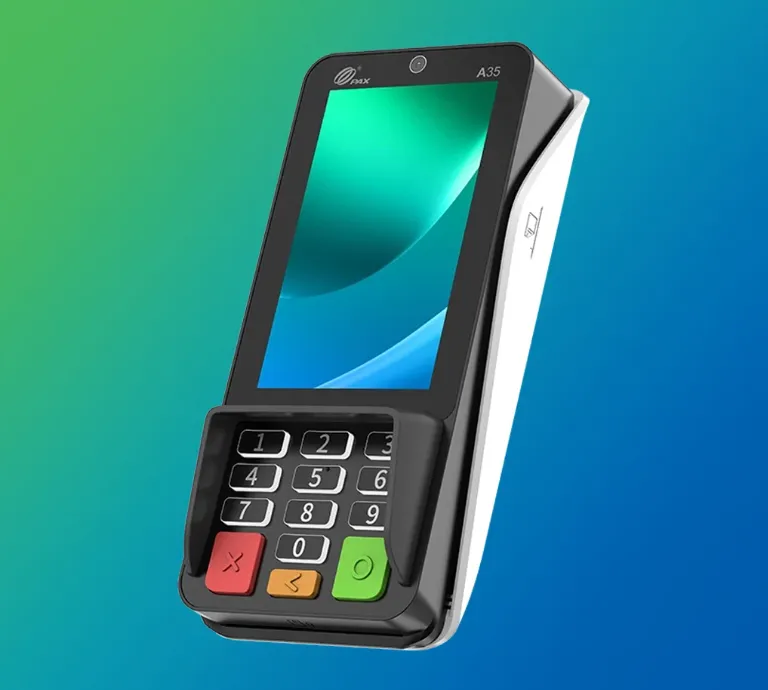
Electronic payments have become a standard part of retail transactions, making reliable payment hardware an important consideration for businesses of different sizes. A payment terminal allows customers to complete card-based and other supported electronic transactions at the checkout, while connected point-of-sale software can record the transaction and update business information.
However, choosing payment equipment involves more than selecting a device with a card reader. Retailers need to consider payment methods, connectivity, security, compatibility, customer experience, maintenance, and the way the terminal will interact with existing checkout technology. A suitable payment terminal should fit the retailer’s transaction environment and support secure, dependable payment processing.
What Is a Payment Terminal?
A payment terminal is a device used at a point of sale to accept electronic payments. Depending on the equipment and payment infrastructure, customers may be able to insert, swipe, or tap a payment card, or use another supported contactless payment method.
The terminal communicates with the relevant payment-processing infrastructure to authorize the transaction. Depending on how the system is configured, it can also communicate with POS software so that the transaction amount, payment status, and receipt information are recorded correctly.
Payment terminals can take different forms. Some are fixed devices positioned at a checkout counter, while others are portable or wireless and can be carried to a customer’s location. The appropriate type depends on the store layout, transaction process, connectivity, and customer requirements.
How Does a Payment Terminal Work?
The transaction typically starts when the cashier enters or retrieves the purchase amount through the POS system. The amount is then presented to the customer on the payment device.

The customer provides payment through an accepted method. For card transactions, this may involve inserting the card into a chip reader, tapping a contactless card or device, or using another supported method.
The terminal securely communicates the transaction information for authorization. Once the transaction is approved or declined, the result is returned to the checkout system. If approved, the sale can be completed and a receipt can be generated according to the retailer’s configuration.
The exact process varies by payment network, processor, terminal configuration, and local market. For this reason, retailers should verify compatibility before purchasing equipment.
Which Payment Methods Should a Retailer Support?
Payment preferences differ between customers and markets. A retailer should therefore identify the payment methods most relevant to its customers before selecting a terminal.
Potential options include:
- Chip-and-PIN card payments
- Contactless card payments
- Mobile and digital wallet payments
- Magnetic-stripe transactions were still supported
- Other locally available electronic payment methods
Contactless acceptance can be particularly useful in environments where customers expect quick checkout experiences. However, retailers should not assume that every terminal supports every payment method. Compatibility needs to be confirmed with the payment processor and acquiring institution.
The terminal should also be able to handle the transaction types required by the business, such as purchases, refunds, cancellations, and other supported operations.
Why Is Payment Security Important?
Security should be one of the first considerations when evaluating payment equipment. Payment terminals interact with sensitive payment information, so retailers need appropriate controls to reduce the risk of fraud and unauthorized access.
The PCI Security Standards Council recommends that merchants use approved PIN-entry devices and validated payment software at points of sale. It also recommends regular inspection of payment devices to identify unauthorized modifications or potential skimming equipment.
Physical security is particularly important because criminals may attempt to attach fraudulent components to legitimate terminals. Retail staff should know what their normal equipment looks like and understand how to report suspicious changes.
PCI guidance also emphasizes the importance of protecting payment devices from tampering and unauthorized substitution.
Retailers should therefore establish procedures for inspecting terminals, restricting unauthorized access, and reporting anything unusual.
How Does Connectivity Affect Payment Processing?
A payment terminal needs reliable communication with the relevant payment infrastructure. Depending on the model, this may involve wired internet, Wi-Fi, cellular connectivity, or another supported communication method.
A retailer should consider the reliability of the available connection before installation. A terminal that frequently loses connectivity can interrupt checkout operations and create delays for customers.
Businesses should also determine what happens when the primary connection becomes unavailable. Some equipment may support backup connectivity or specific offline transaction capabilities, but these features vary considerably and may be subject to payment-network rules and processor configurations.
Before deployment, retailers should test the network environment and confirm that the terminal can communicate reliably with the required systems.
What Should You Consider When Choosing a Terminal?
Selecting a payment terminal should begin with the retailer’s actual checkout requirements. Important considerations include transaction volume, store layout, supported payment methods, connectivity, integration capabilities, security features, and maintenance.
A useful evaluation can include:
- Supported payment methods
- Contactless capability
- Chip-card compatibility
- Screen and keypad design
- Fixed or portable operation
- Network connectivity
- POS integration
- Security certifications or approvals
- Software update support
- Warranty and maintenance arrangements
- Replacement and repair procedures
The physical design also matters. A compact terminal may work well for a small checkout counter, while a larger retail environment may require multiple devices positioned across different checkout points.
How Does a Terminal Work With POS Software?
A payment device is often connected to a broader checkout environment. The POS system may calculate the transaction total and send that amount to the payment device. After authorization, the result can be returned to the POS system so the sale is recorded.
This integration reduces manual entry and can help prevent errors caused by entering transaction amounts separately into different systems.
For retailers evaluating a point of sale system retail setup, compatibility between the payment hardware and POS software should therefore be checked carefully. The systems need to communicate correctly for sales, refunds, transaction records, and reporting.
Retailers should also determine whether the payment equipment can integrate with existing software or whether additional hardware or software changes will be necessary.
What About Maintenance and Updates?
Payment equipment requires ongoing attention after installation. Retailers should keep devices clean according to manufacturer instructions, inspect them for signs of tampering, and ensure that authorized software and security updates are applied when required.
PCI Security Standards Council guidance notes that merchants should regularly check PIN-entry devices and POS equipment for rogue software or skimming devices.
Physical condition should also be monitored. Damaged screens, worn keypads, faulty card readers, or unstable connections can affect transaction reliability.
Businesses should establish a process for reporting equipment problems and determining when a terminal needs repair or replacement. Having a documented procedure can reduce disruption when hardware fails.
What Should Retailers Check Before Deployment?
Before putting a new payment terminal into regular use, retailers should test the complete payment process. This includes checking the connection between the terminal and POS software, testing supported payment methods, confirming transaction authorization, and verifying that receipts and transaction records are generated correctly.
Staff should also receive basic training. Employees need to know how to initiate transactions, handle common errors, process permitted refunds, identify suspicious terminal behavior, and escalate technical problems.
Security training is particularly important because employees are often the first people to notice unauthorized changes to payment devices.
Conclusion
A reliable payment terminal is an important part of a modern retail checkout environment, but selecting the right device requires consideration of more than payment acceptance alone. Retailers should assess supported payment methods, security, connectivity, POS integration, physical design, maintenance, and long-term support. Security should remain a priority throughout the terminal’s lifecycle. Appropriate devices, validated payment software, regular inspections, and staff awareness can help retailers reduce risks associated with payment fraud and unauthorized device modification. For businesses evaluating a point of sale system retail environment, payment hardware should be selected as part of the overall checkout architecture. When the terminal, POS software, connectivity, security controls, and staff procedures work together effectively, retailers can create a smoother and more dependable payment process for everyday transactions.
Related Reading: Hair Transplant Turkey — full guide
Related Reading: Ornamental Pruning in Cook County, IL — full guide
Related Reading: Why Marsa Alam Should Be Your Next Dive Destination in Egypt? — full guide
Related Reading: What is the Cost of Midea Ducted AC — full guide
Related Reading: How to Choose the Best Sunscreen for Your Skin
Related Reading: How to Choose Between Buying and Renting a Home — full guide
Transforming Industrial Paradigms
Over the past decade, rapid technological maturation has dismantled traditional boundaries. Industry pioneers are prioritizing sustainable materials, optical network efficiency, and adaptive user interfaces.

Modernist architectural integration exemplifying passive solar cooling and sustainable timber frame structures.
The Horizon Ahead
As we look forward to the remainder of 2026, the convergence of artificial intelligence, high-efficiency energy systems, and refined physical design promises to elevate human potential to unprecedented heights.